
Field Service
Signed on site. Even offline.
The document generator built for Salesforce Field Service. With no signal, the technician previews, answers, signs and taps Submit in the Field Service mobile app. When the phone syncs, the file is made and saved to the work order.
- 1
No signal.
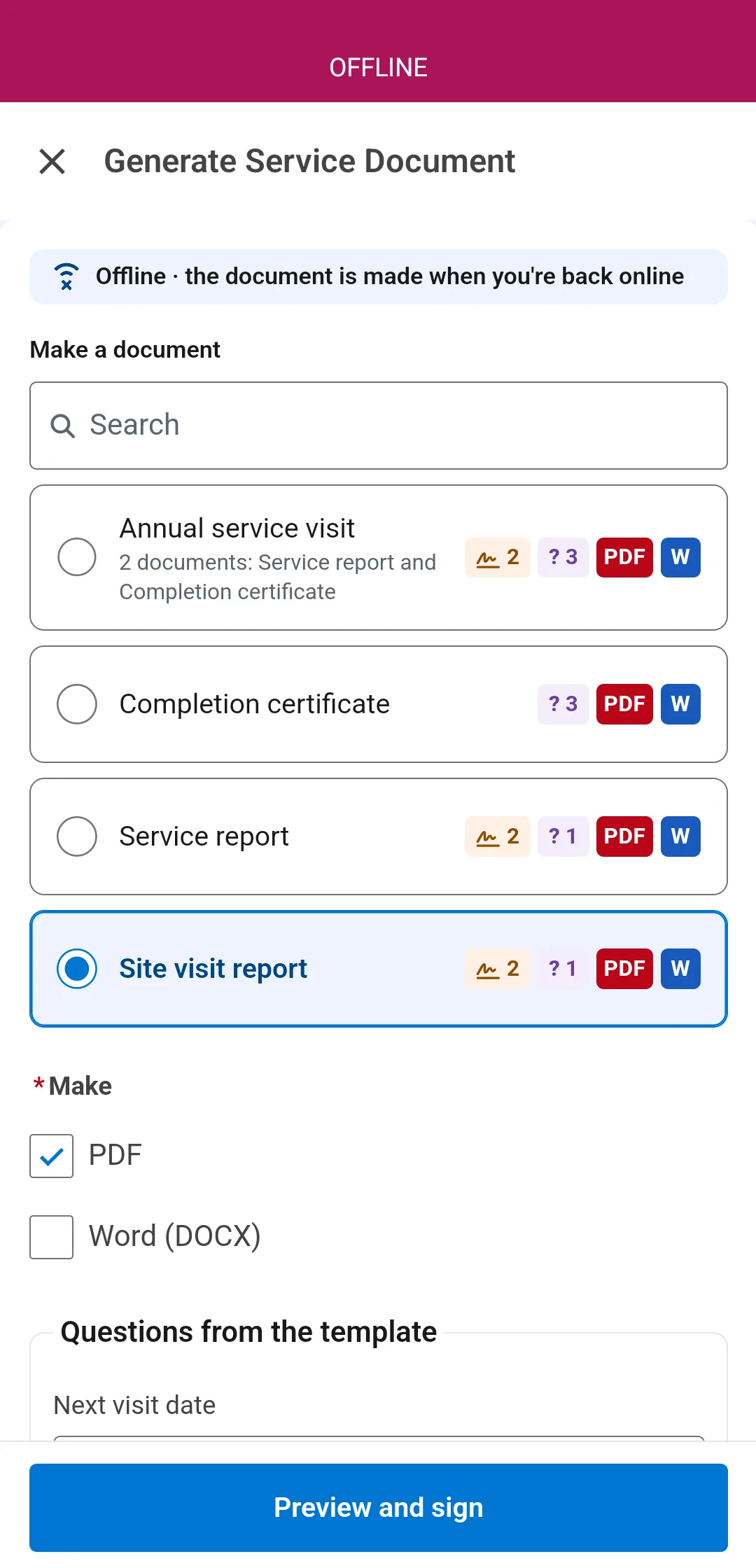
The job opens from the schedule. The app still lists the documents for this visit, and only the ones that apply to it.
- 2
Preview and answer.
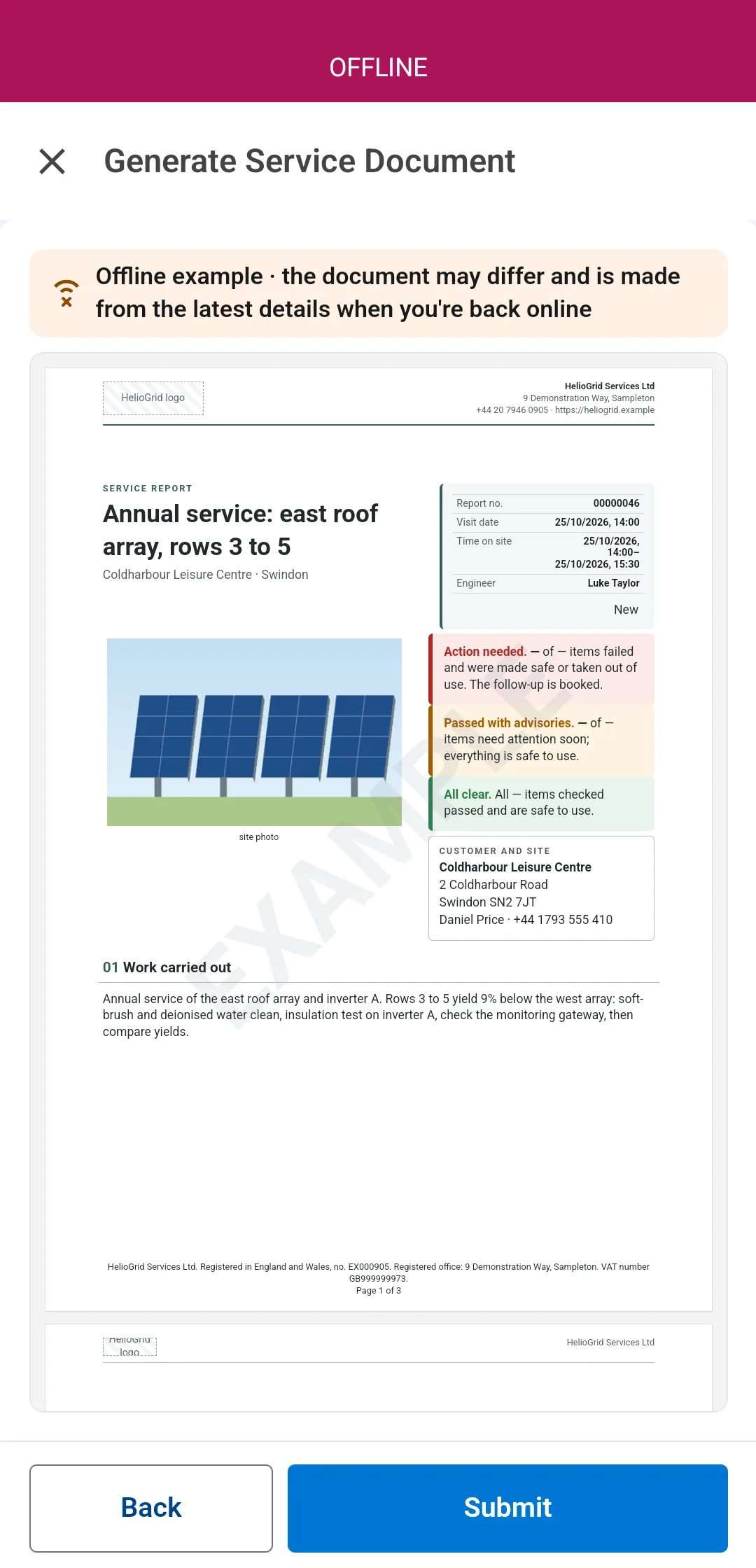
An example of the document is on the phone, filled from what it holds, with its photos and its questions. The technician checks it and answers them on the spot.
- 3
Sign on the screen.
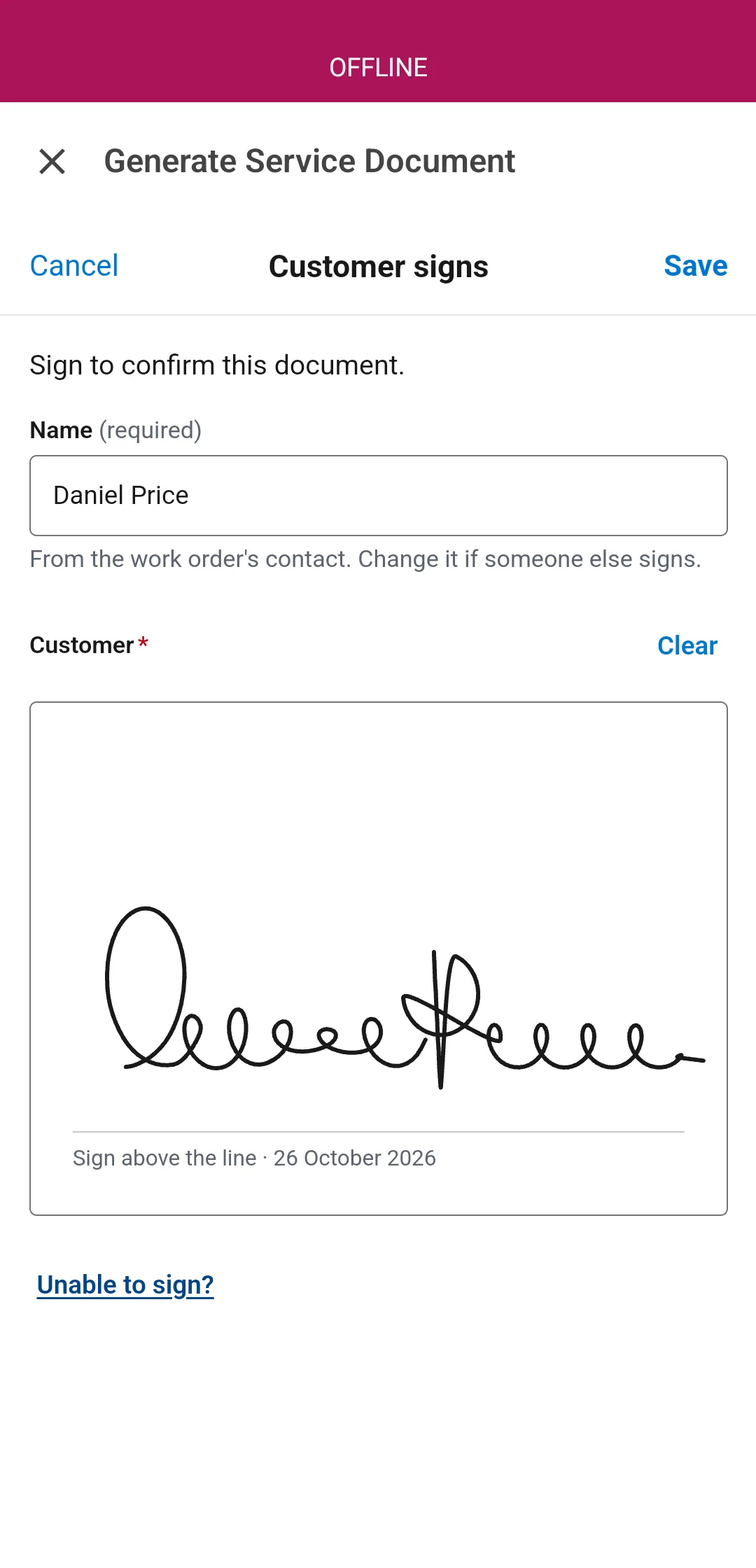
Where the document collects signatures, the customer signs with a finger on the phone, with no signal. Each signature is kept on the job and printed in the document.
- 4
Submit. Done.
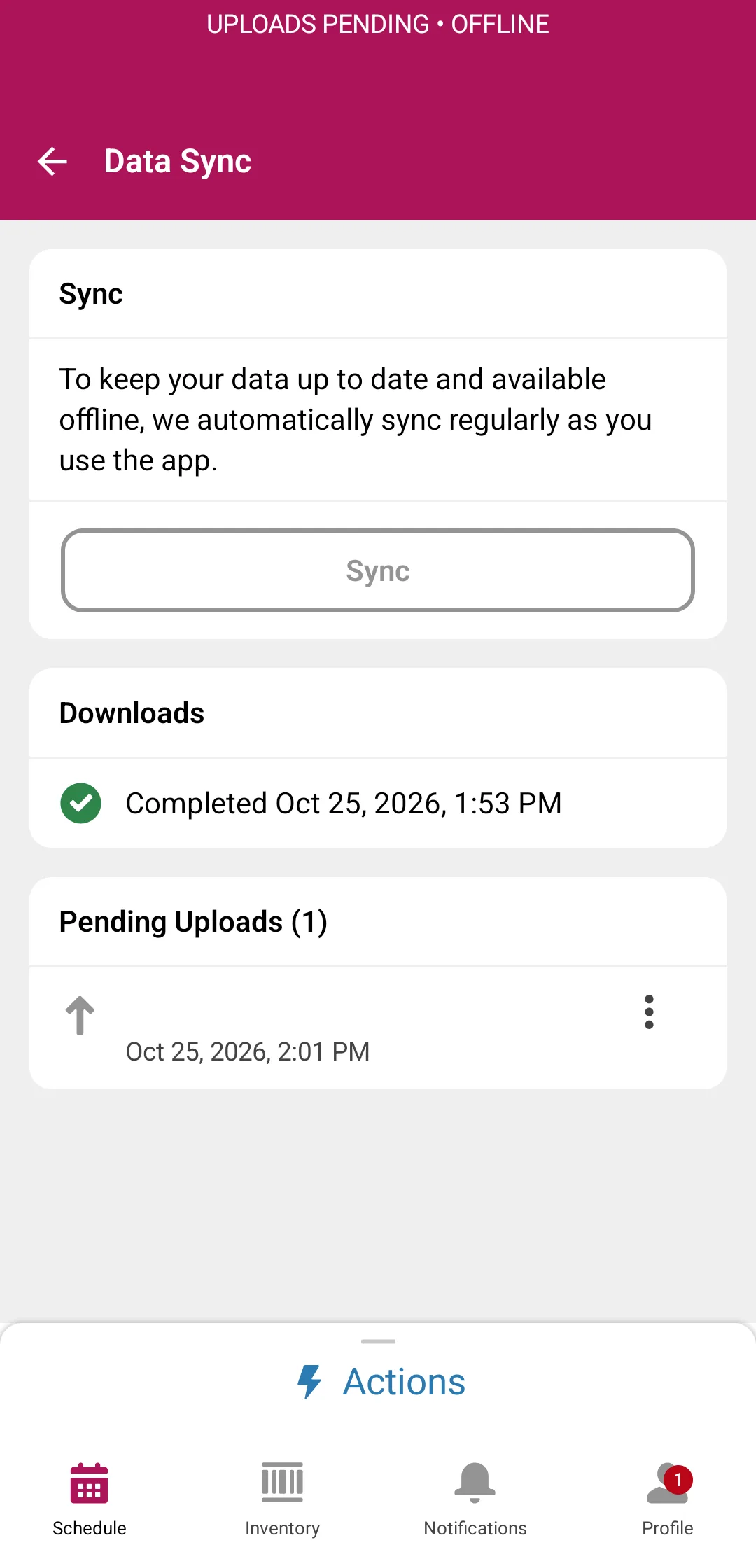
The request is saved on the phone with the job's other changes. The technician moves on to the next job.
- 5
Synced. Made and filed.
When the phone reconnects, Docable makes the file from the latest details, with the signatures and the photos taken on the job, and saves it to the work order. Nothing to tap again.
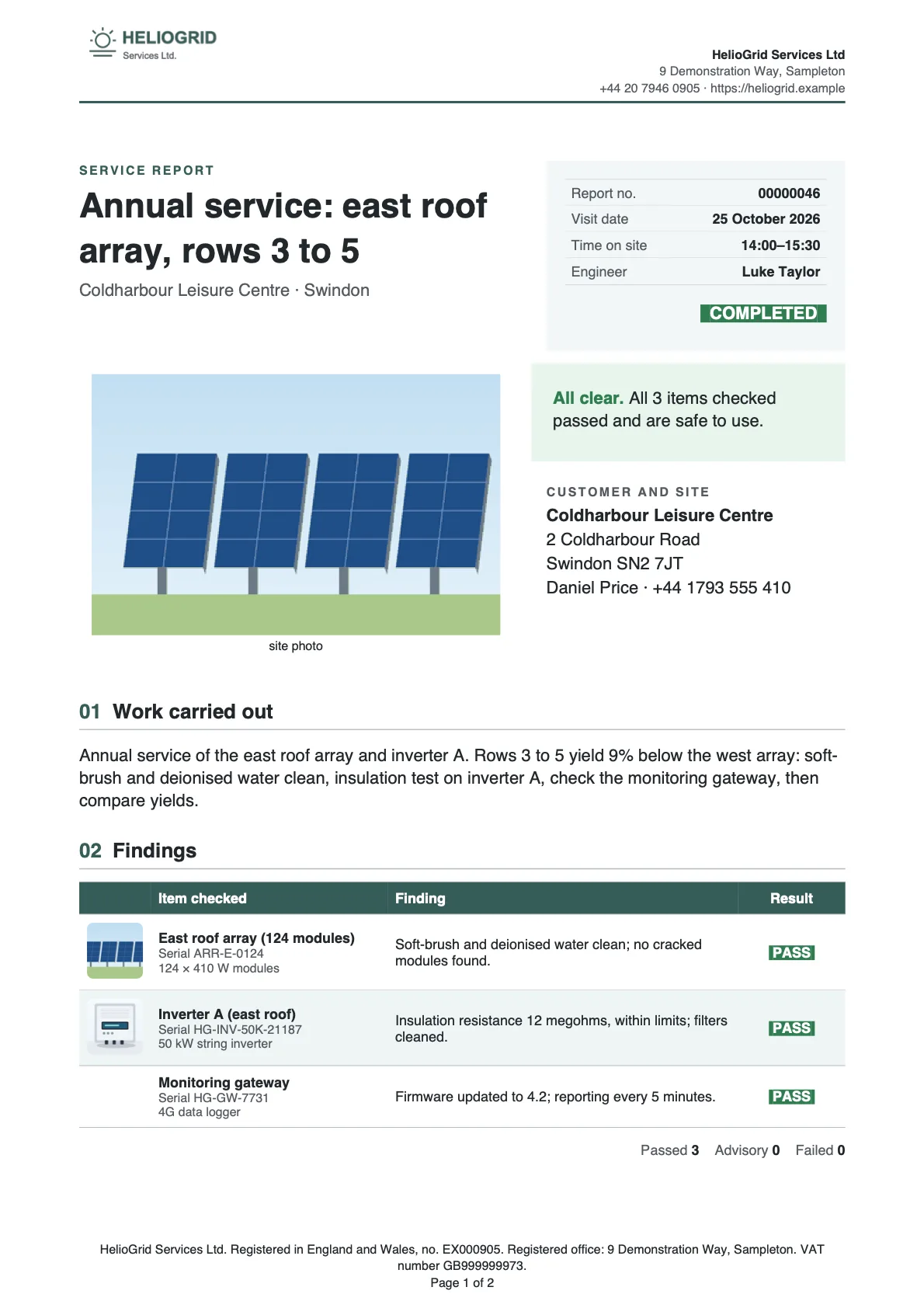


Which documents, on which jobs.
An Offer when rule on each template decides, so the technician sees only what fits.
- InstallationWork Type · Installation
- Annual serviceWork Type · Annual service
- BreakdownWork Type · Repair
- Job sheet
- Commissioning certificate
- Service report
- Gas safety record
- Warranty claim
- Parts used
- Invoice
Works inside Guided Experience.
Generate Service Document drops into a Guided Experience step as a card: the report, the signature and the certificate become part of the path.
- A Lightning Quick Action card
- A required step, if you want
- Online and offline
Questions, when the job form hasn't got it.
A reading nobody stores, the words for the certificate, a yes or no for this visit: asked on the phone, offline too, checked on sync.
- Text, number, date, yes or no, a choice
- Required before Submit
- Only for what the record can't hold
Shown only when it applies.
One template, with a section that appears only when the job needs it.
| Location | Appliance | Safe to use |
|---|---|---|
| Kitchen cupboard | Combination boiler | Yes |
| Living room | Gas fire | No |
| Kitchen | Gas hob | Yes |
| Location | Appliance | Safe to use |
|---|---|---|
| Utility room | System boiler | Yes |
| Kitchen | Gas hob | Yes |
- One appliance failed
- Everything passed
Sign on the screen.
A full-screen pad, with the name from the job and the date, stored on the record as a Digital Signature.
The customer signs with a finger
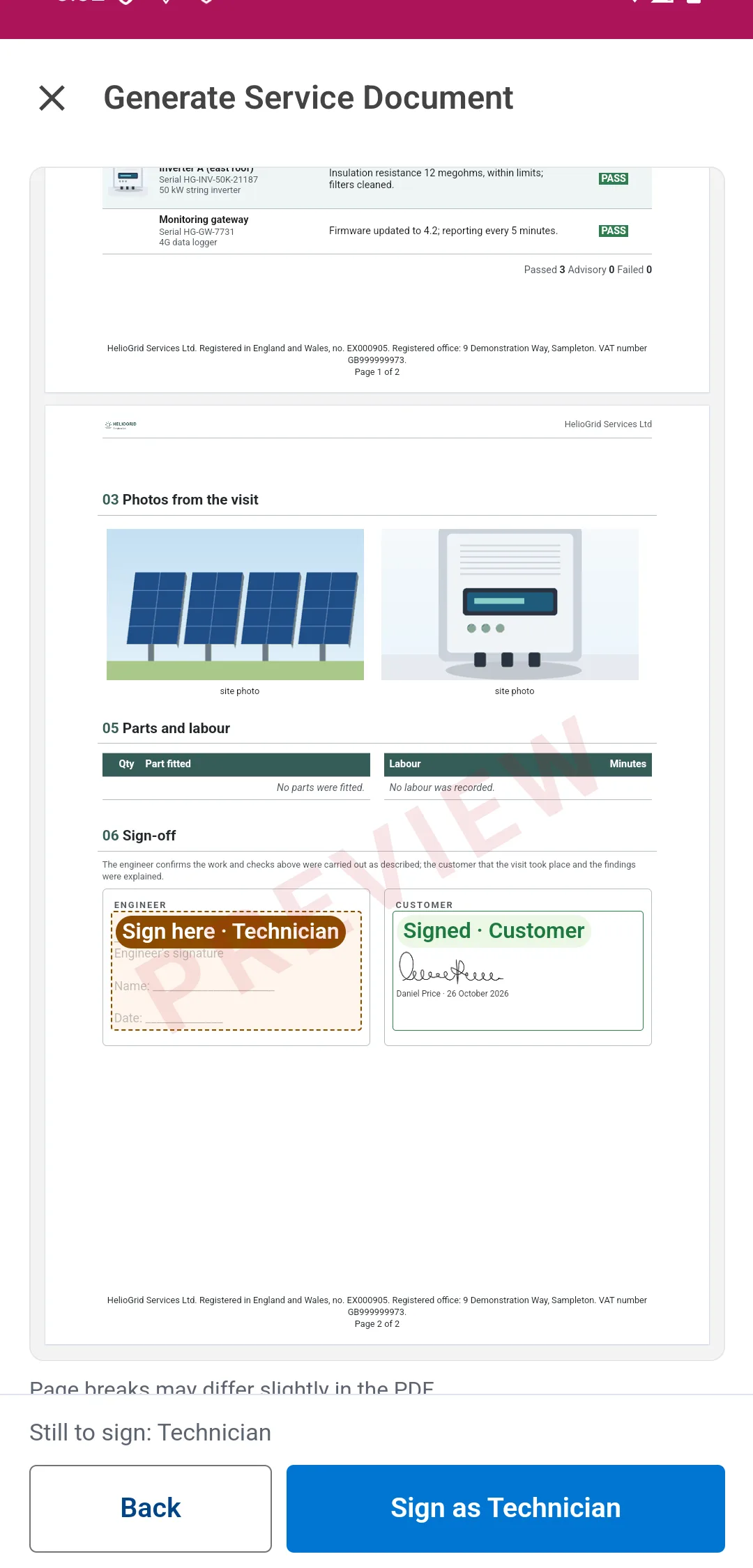
Signed in the preview, with the name and date; the technician next

One signatory. Or four.
Customer, technician, engineer, witness: each its own box, printed with the name and the date.
- Customer
- Technician
- Engineer
- Witness
- 1 One signatory
- 4 Up to four, by type
- The technician's own, kept
- A signing line where nobody signs
When they can't sign, say why.
A reason from your own list, printed in the document and copied to a Task.
- Customer not on site
- Gate locked, no access
- Refused to sign
- Signed on paper instead
One signing. Several documents.
A visit pack: the service report, the gas safety record and the invoice together, as one PDF.
- Service report
- Gas safety record
- Invoice
- Two to six documents
- Offered first on the job
- Online and offline
- Named in Docable Setup
The document, as made.
Both signatures, each with the name and the date, in the document filed on the work order as PDF, Word or both.

- Filed on the work order
- PDF, Word or both
- Photos taken before Submit
If it can't be made, you hear.
If the document can't be made on sync, Docable keeps trying for about forty minutes, signatures kept; then the technician gets a notification with the reason.
- Retries for about forty minutes
- A notification with the reason
- Nothing signed is lost
After the visit, by itself.
A Flow emails the customer the signed report the moment it's made, and another puts the reason on a Task; both ship as samples.
- Email the customer: sample Flow
- The reason on a Task: sample Flow
- Any Flow, any object
Setup that checks itself.
Docable Setup checks the org setting, each technician's permissions and their schedule, and says what to fix.

- Org and technician checks
- Each with its fix
- Read-only
The big ones, drafted by AI.
Describe it and your AI drafts the photo galleries, pass-or-fail tables and conditional sections in minutes; a person checks it and makes it live.

- Build with AI in Docable
- An Agentforce agent, with Docable's actions
- Claude, through Docable's MCP server
- Never sees your records
- A person checks it and makes it live
Claude built this one in seven minutes.
One brief, the HelioGrid Brand Kit and Docable's MCP server. A real run: the conversation, and the certificate, as made.
- You
Build a commissioning certificate for a solar installation on the HelioGrid Brand Kit: site photos, string-by-string readings, pass-or-fail tests, two signatures, and hide anything blank. Prove it on a real job.
- Claude
Reading Docable's authoring guide and the Work Order's fields. Creating the template: HelioGrid's letterhead and footer, a gallery of site photos, and a table of the strings. Five pass-or-fail questions are asked when it's made. An Observations section appears only when there are notes. Two signatures, the engineer's and the customer's, are signed on the device.
- Claude
Docable refused two details and said exactly where: a signature setting and a link label. Fixed. This org has no fields for string readings, so the table reads each line's notes and result; connect your own readings fields in the editor.
- Claude
Validated clean: no problems, no placeholders. Proofs made as PDF and Word on work order 00000019, Coldharbour Leisure Centre, with HelioGrid's kit. Seven minutes from your brief to the first proof.


- Photo gallery
- String-by-string table
- Pass-or-fail questions
- A section only when there are observations
- Two signatures
- Made as PDF and Word
Every document a visit needs.
30 starters: before, during and after the visit, and the records compliance asks for.


- Job sheet
- Service report
- Branded service report
- Asset inspection report
- Completion certificate
- Job estimate
- Job invoice
- Landlord gas safety record
- PAT test record
- Risk assessment and method statement
- Permit to work
- Backflow prevention assembly test report
- Fire extinguisher inspection report
- HVAC maintenance record
- Appointment confirmation
- Asset service history
- Expense claim
- Inspection and test certificate
- Meter installation certificate
- Parts request and pick list
- Parts transfer note
- Planned maintenance schedule
- Refrigerant service record
- Technician run sheet
- Time sheet
- Vehicle health check
- Warranty claim
- Water hygiene log
- Return authorisation (RMA)
- Warranty certificate
Compared with the built-in Service Reports.
More room to design, and more features, on the same Salesforce data. Salesforce's Document Builder does the standard signed report well (sources below).
| Docable | Field Service Document Builder | |
|---|---|---|
| Output | PDF, editable Word, or both, from one template | PDF only |
| Objects | Any object, standard or custom: work orders, line items, appointments, assets, cases, orders | A limited set of standard objects, such as Work Order, Service Appointment and Quote |
| Many at once | One record or thousands, in the background, on a schedule or from a Flow | Synchronous only; no batch |
| No signal | Preview, answer questions, sign and submit in the Field Service app; made and filed when the phone syncs | Offline mobile signatures |
| Layout | A Word-like editor: Brand Kits, photos, tables, charts, conditions, headers and footers | Sections, tables and components set in a builder (“moderate layout control”, in Salesforce's words) |
| On the job | Only the documents that apply, questions on the phone, visit packs, unable-to-sign reasons | — |
| The rest of the org | The same product makes the quote, the invoice, the contract and the letter | Field Service documents |
| Price | In the one Docable price, £399 a month for the whole org | Included with Field Service, Revenue Cloud Growth and Revenue Cloud Advanced |
Sources: Salesforce Help, Document Generation overview; Salesforce Help, Document Generation requirements; Salesforce Help, Document Builder and Document Generation; Salesforce developer documentation, Create Service Document action; Salesforce developer documentation, Create Service Report action.
Ready for everything else.
The same editor, Brand Kits and approval make the quote, the invoice and every letter the office sends, for one price.
And more.
- Salesforce mobile app, while connected
- Opens in the app's own viewer
- A Brand Kit chosen per record
- Record page, lists, Flow, schedules, Apex, REST, Claude and Agentforce
- QR codes and barcodes
- Photo galleries from the record
Questions, answered.
Can technicians get a signed service report with no signal?
Yes. With no signal, the technician previews the document in the Field Service mobile app, answers its questions, signs and taps Submit. On sync, Docable makes the PDF, Word file or both and files it on the work order.
What happens on the phone when there is no signal?
Generate Service Document lists up to 25 documents from the last sync. Preview shows an example filled from what the phone holds, photos included. The technician answers, signs and taps Submit; the file is made on sync.
Which phones and apps?
The Salesforce Field Service mobile app on iPhone and Android, online and offline. The Salesforce mobile app has Docable's Generate Document action too, while connected.
What does an admin set up?
One org setting, two permissions and a Docable role for each technician, and the action on the layout. Docable Setup checks it all and says what to fix.
Which objects can a document be made on?
Any object, standard or custom: Work Order, Work Order Line Item, Service Appointment, Asset, Maintenance Plan, Time Sheet and the rest. The document is filed on the record the technician is on: one per boiler, per visit or per job.
Can the technician choose which documents to make?
They see only the templates on that object offered for that job. Each template's Offer when rule decides, from any field of the record, its lookups or the account: a gas safety record only on an annual service.
How do signatures work?
Up to four per template, by type: Customer, Technician, Engineer, Witness, as your org names them. Each is drawn on a full-screen pad, printed with the name and date, and stored as a Digital Signature. Your own can be saved.
What if the customer can't or won't sign?
They pick a reason from your own list, set in Salesforce Setup, with a note if you ask. It prints in the document; a sample Flow copies it to a Task. You choose which signature types allow it.
Can part of a document appear only on some jobs?
Yes. A section, table or line can show only when a condition holds, such as an appliance failing or a field being filled in, and blank values can hide themselves. One template covers every variant.
Can a template ask questions at the point of generation?
Yes, for what the job form can't hold, such as a reading nobody stores. Text, number, date, yes or no, a choice; required ones before Submit; offline too, checked on sync. Most templates ask nothing.
Does it work with Field Service's Guided Experience?
Yes. Generate Service Document is a Lightning quick action: an admin drops it into a Guided Experience step as a card, required or optional. The technician makes, signs and submits the document in the path, online or offline.
Can one visit produce several documents with one signing?
Yes. A visit pack in Docable Setup groups two to six templates on one object, such as the service report, gas safety record and invoice: one signing, one PDF, offered first on the phone, online and offline.
Do photos taken on the job appear in the document?
Yes, as galleries of the record's photos by title. Photos taken before Submit are in the document made on sync, even if still uploading; a photo taken after Submit goes in the next one.
Where does the document go, and in what format?
On the record, under Files: PDF, editable Word or both, named as the template says. Optionally also SharePoint, Google Drive or Amazon S3, through a storage destination your admin connects.
Can the customer get their copy automatically?
Yes, by Flow: a record-triggered Flow emails the signed report the moment it is made, and Docable ships a sample to copy. Emailing is done by Flow, not from the sign step.
What if the document can't be made when the phone syncs?
Docable retries for about forty minutes, with the signatures kept. If it still can't, the technician gets a Salesforce notification that opens the record with the reason.
How is this different from Salesforce's Service Reports and Document Builder?
They come with Field Service and do a standard signed report well. Docable adds a Word-like editor, Brand Kits, photo galleries, conditional sections, any object, phone questions, visit packs, PDF and editable Word, bulk runs, and the office's documents.
Can a Flow make the service report?
Yes. Docable runs from Flow, so a record-triggered Flow can make the document when the work order closes, file it on the record and email it. Salesforce's own Create Service Report action can't start from a flow.
Can we keep Salesforce's Service Reports?
Yes. Docable adds its own action to the layout and changes nothing about Service Reports or Document Builder. Use both while you move across.
Do we need a DocGen licence or OmniStudio?
No. Docable is its own package and makes every document with its own code inside your org.
Do we need Field Service to use Docable?
No. The same editor makes documents on any object, for every team. Field Service is where Docable starts.
Do we need a developer?
No. An admin builds templates in the editor and adds the action to the layout; Docable Setup checks the org and each technician.
What compliance documents are ready-made?
30 field service starters, listed above: from the appointment confirmation and job sheet to the gas safety record, PAT test record, refrigerant record and water hygiene log. Have statutory wording reviewed.
How long does a big template take to build?
Minutes. Describe it; AI drafts it with fields, galleries, conditions and brand placed: in Build with AI, an Agentforce agent, or Claude on Docable's MCP server. A person proves it on a real job and makes it live.
Can the same template make documents for thousands of jobs at once?
Yes, in the background from a list, a Flow, a schedule, Apex or REST, filed on each record, with one combined PDF if you want it. No per-document fee.
Does any data leave Salesforce?
No. Every document is made inside your org by Docable's own code, as the person who asks, with their permissions. Nothing leaves unless your admin connects a storage destination or a data provider. The AI never sees your records' values.
What does it cost?
£399 (or US$499) a month per production org: any number of technicians and documents, every sandbox included.
Is Docable on the AppExchange?
Not yet. Docable is a member of the Salesforce Partner Program, on its way to the AppExchange. Join the waitlist to hear first and be first to install.
Learn how.
Step-by-step guides, with the screens.
- Field service documents: the complete guideEvery document a visit needs, where each is made, and the offline journey end to end.
- Make a document on a phoneThe Field Service app, online and with no signal, step by step.
- Set up the Field Service appThe setting, the permissions, the reasons list and the setup check.
- SignaturesSignature blocks, signed when the document is made.
- Field service report recipeBuild the HelioGrid service report step by step.

Be first in the field.
Join the waitlist and we'll tell you the moment Docable is ready to install, with a sandbox to try the service report in.