
Make documents for many records
Last updated 26 October 2026.
For administrators and Flow builders: at the end a background run has made one document for each record you chose, and you can see each one in the run.
Before you start
- The running user holds Docable Generate and Docable Runtime Generator Storage, and can run the Flow.
- The template is active, and every record is of the template’s object.
Steps
-
In Flow Builder, add the action Start Docable generation job (category Docable Studio). Under Template, choose your active template. Under Records, choose A list of records and give the collection of record Ids. Under Outputs, choose PDF, Word or PDF and Word.
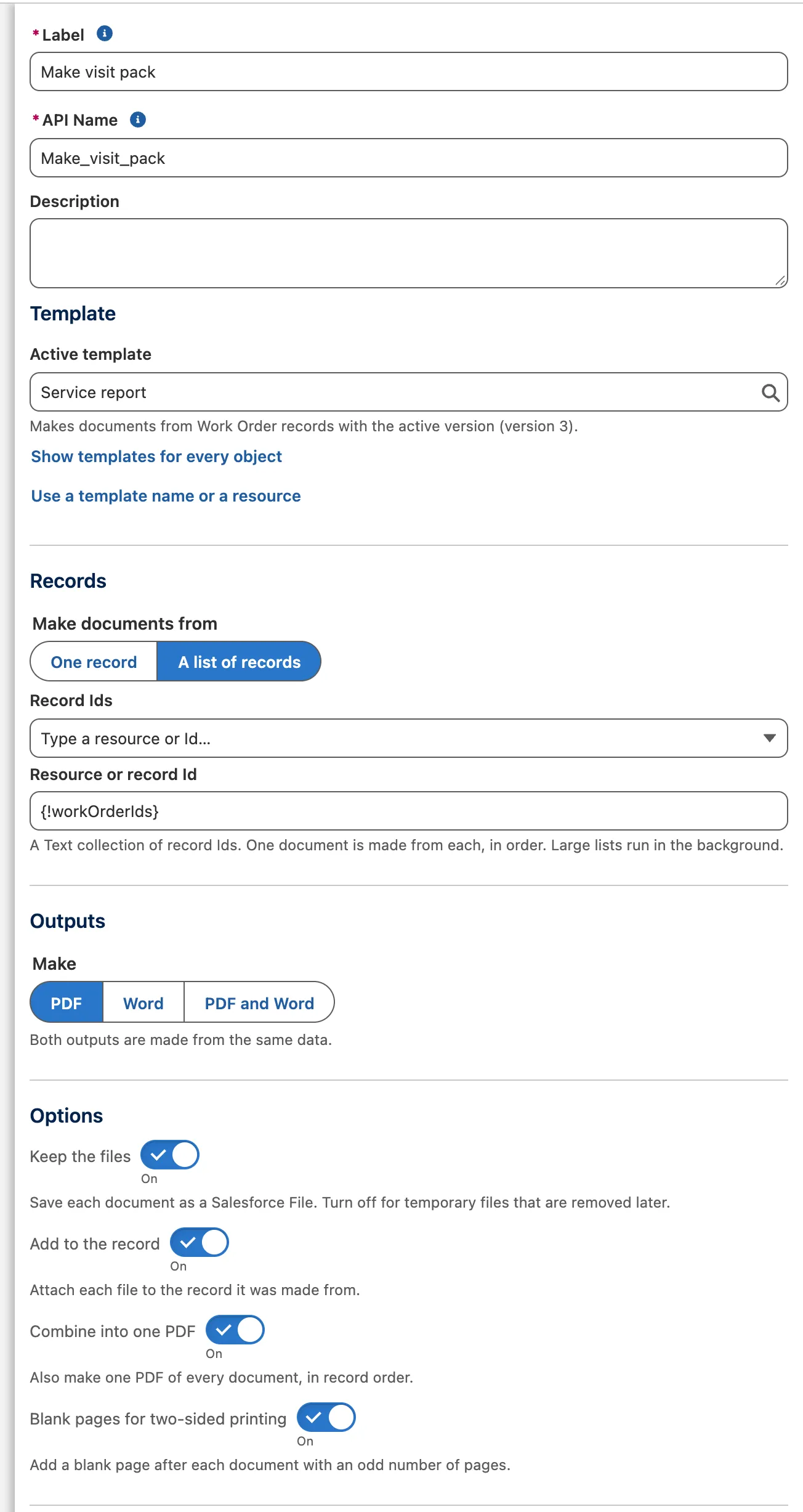
The Start Docable generation job action: the active template, A list of records from a collection, Make PDF, and Combine into one PDF on. Optional: set Brand Kit to one of the template’s kits to print every document of the run with it, for example the US kit for a US mailing. Blank keeps the template’s own choice.
-
For one printable set, tick Combine into one PDF, and Blank pages for two-sided printing if you print two-sided. Run the Flow.
-
Open the Generation Runs tab. The run reads Queued, then Being made, then Made, with how many documents are made.

The Generation runs tab: every run newest first, with how many documents were made, the mode it read the records in and the Brand Kit choice. -
To make more documents, start another run from the same Flow or from Apex. Each run is made in the background, one document at a time. If one record has a problem, the others still get their documents, and the run shows which one to fix.


From Apex, send several record Ids to DcsGenerateV1.generate. Over REST, send recordIds to requestGeneration. See Flow, Apex and REST.
There is no fixed cap on the number of records. The real limits are your org’s File storage, its daily allowance of background jobs and new Files, and time: a run that would use up an allowance waits and carries on within the hour rather than failing. One request holds about 40,000 record Ids while someone waits, and about 80,000 in a background call; for more, split the Ids into several requests.
Example
A service report for three work orders, with one combined PDF.
| Input | Value |
|---|---|
| Template name | Branded service report |
| Record Ids | The three work orders |
| Outputs | PDF |
| Combine into one PDF | On |
| Blank pages for two-sided printing | On |
Check it worked
The run reads Made, with 3 of 3 made. Open it to see each work order’s File and the combined PDF, one set of pages for every document in record order.
If it doesn’t work
| What you see | What to do |
|---|---|
The request is refused with GENERATION_QUEUE_BUSY. |
Docable already has as many document jobs waiting as it allows. Send the request again in a few minutes. |
| The run shows documents that failed. | Open the run and choose Retry failed documents. Documents already made are kept. |
A document stops with GENERATION_WORKER_INTERRUPTED. |
It needed more processing or memory than Salesforce allows for one document. Try again, and if it fails again show fewer rows or pictures. |
Next
Something unclear or wrong? Tell support. Product page: PDF and Word output.