
Generate documents from Flow
Last updated 26 October 2026.
At the end a Flow makes a PDF or Word document whenever a record changes, for example when a work order completes, and keeps it on the record. For Salesforce administrators who build Flows.
Before you start
- The Flow’s running user holds Docable Generate and Docable Runtime Generator Storage, and may run the Flow.
- The template is active. The actions work in screen, record-triggered, scheduled and autolaunched Flows.
Steps
-
In Flow Builder, create a record-triggered Flow on the object, for example Work Order, that runs when its Status becomes Completed.
-
Add an Action element and search for Generate Docable document. It is in the category Docable Studio.
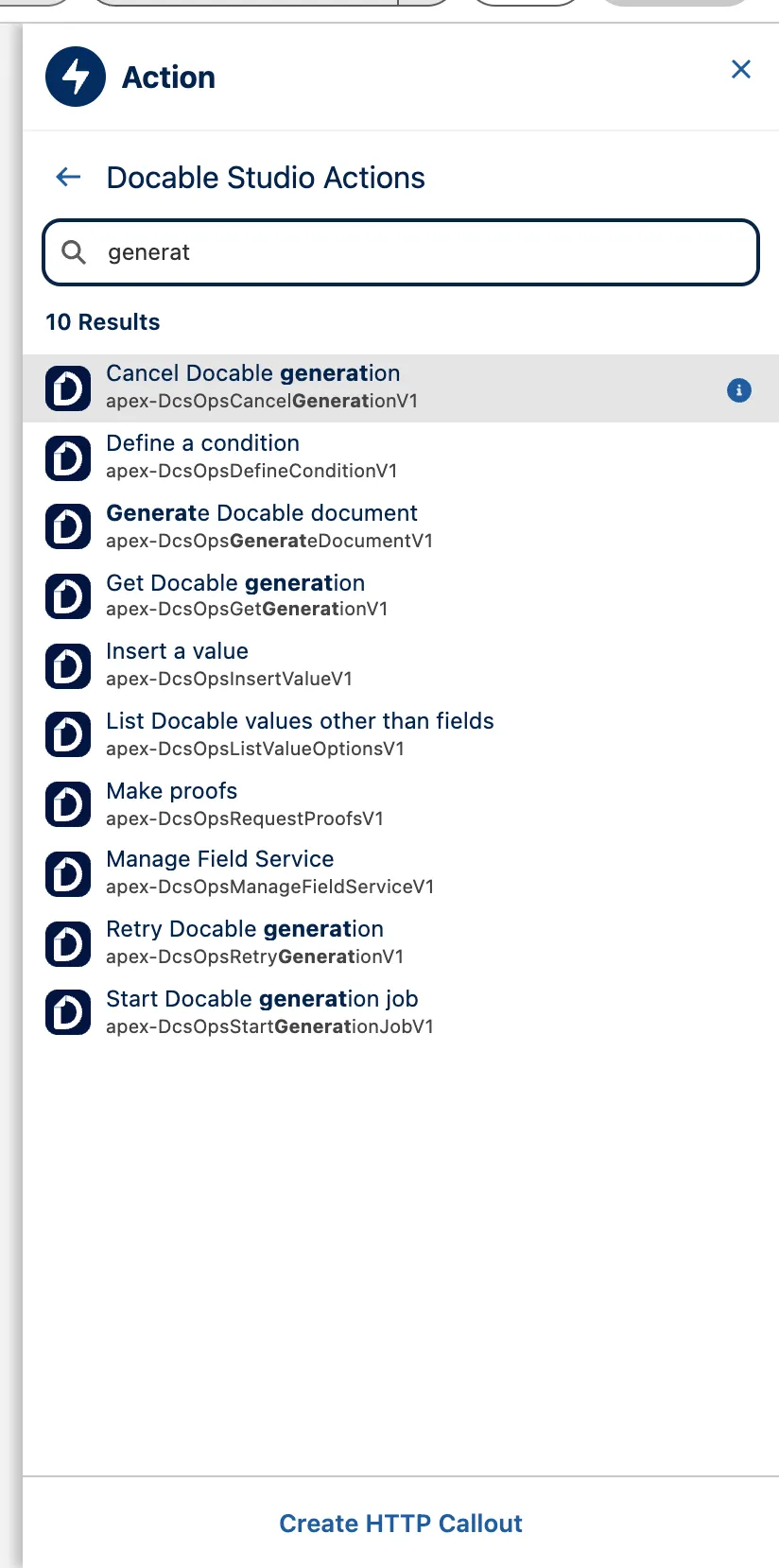
Flow Builder's action picker filtered to the Docable Studio category: Generate Docable document and Start Docable generation job among the results. -
Under Template, choose your active template from the list, or choose Use a template name or a resource to type its name. Under Records, keep One record and set Record Id to
{!$Record.Id}. -
Under Outputs, choose PDF, Word or PDF and Word.
-
Turn on Run in background, so saving the record never waits for the document.
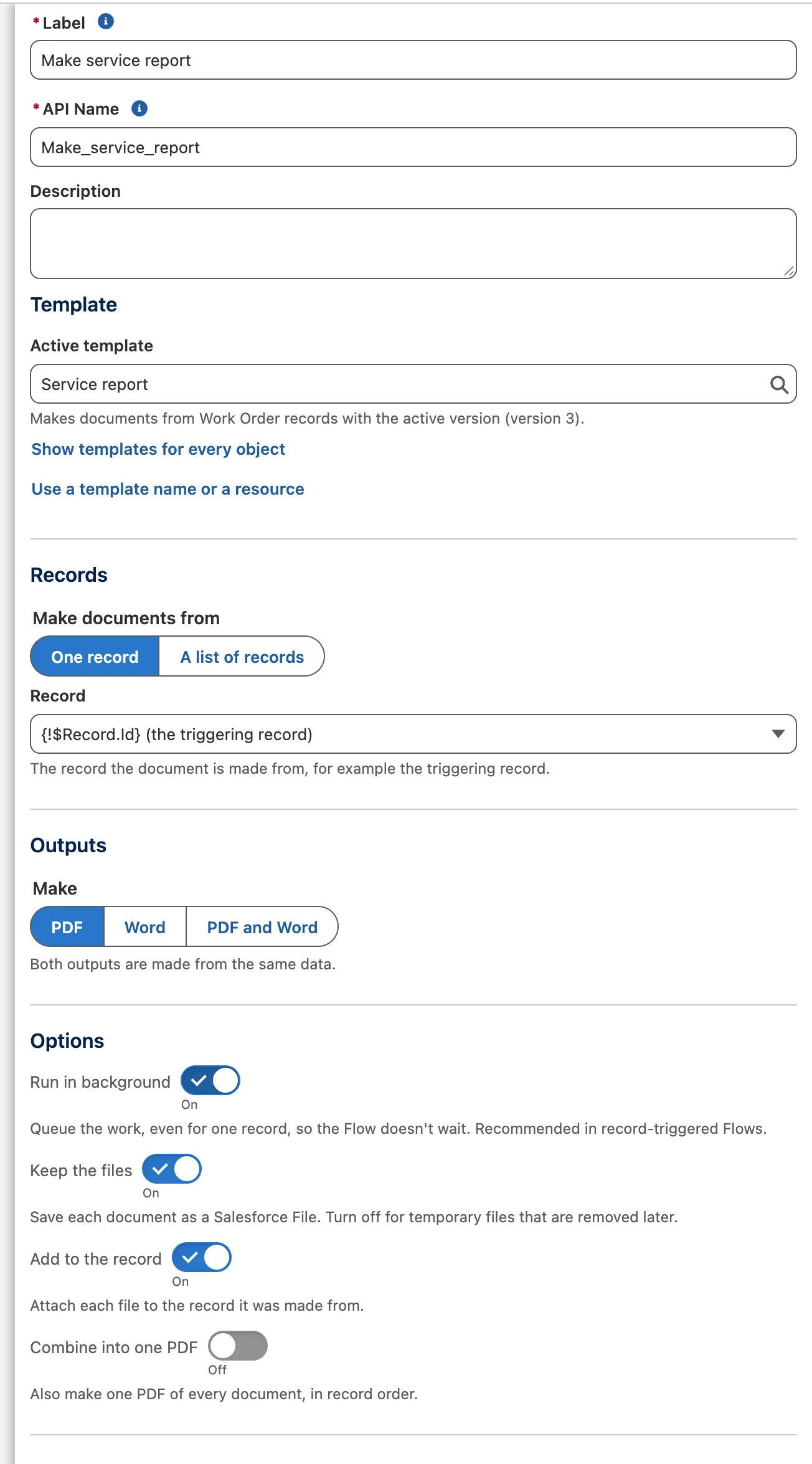
The Generate Docable document action: the active template chosen, Record Id set to the triggering record, Make PDF, and Run in background on. -
Optional: under More settings, set Brand Kit to one of the template’s kits, by name or from a resource, to print every document of this run with it. Leave it blank for the template’s own choice.
-
Save and activate the Flow.


All the inputs and outputs are in Generation request and result fields. For many records use Start Docable generation job, then Get Docable generation.
Example
The action for a completed work order, as it saves in the Flow:
<actionCalls>
    <name>Generate_document</name>
    <label>Generate document</label>
    <actionName>DcsOpsGenerateDocumentV1</actionName>
    <actionType>apex</actionType>
    <flowTransactionModel>CurrentTransaction</flowTransactionModel>
    <inputParameters>
        <name>templateName</name>
        <value><stringValue>Branded service report</stringValue></value>
    </inputParameters>
    <inputParameters>
        <name>recordId</name>
        <value><elementReference>$Record.Id</elementReference></value>
    </inputParameters>
    <inputParameters>
        <name>outputs</name>
        <value><stringValue>PDF</stringValue></value>
    </inputParameters>
    <inputParameters>
        <name>runInBackground</name>
        <value><booleanValue>true</booleanValue></value>
    </inputParameters>
</actionCalls>
Check it worked
Complete a work order. A run appears on the Generation Runs tab, then reads Made, and the PDF is added to the work order. The action declares no callout, so Salesforce accepts it in a record-triggered Flow’s save.
If it doesn’t work
| What you see | What to do |
|---|---|
| Success is true but there is no File yet. | A queued run is accepted, not finished. Check Completed, or follow the run with Get Docable generation. |
| The request is refused with a licence or permission code. | The running user needs the two permission sets above and a Docable licence. |
| The document reads a field the running user cannot see. | A Flow runs as the person. System mode is not switched on by itself: a request must ask for it with Run mode, and the template must allow it. |
Next
Something unclear or wrong? Tell support. Product page: Automation and API.