
How the Ternbrook delivery note was built
Last updated 26 October 2026.
The sample uses the Ternbrook Brand Kit. Colours are Brand Kit colours (Muted text and the Brand Kit’s table style).
Before you start
- Docable installed, and access to create templates: see Permissions and readiness.
- An approved Brand Kit: see Give your documents a Brand Kit.
- An order, TB-DN-55821 in the sample, with its order products. The org needs Orders.
Start from the Delivery note quick start
-
In the Docable app, open Templates, choose New, then Start from a quick start.
-
Choose Delivery note.
-
Under Brand Kit, choose your approved kit. The sample uses Ternbrook.
-
Choose Use as it is. The template opens in the editor, built on Order, with the order’s products as the list Order Products. The gallery offers it when the org has Orders.
The blocks on the page
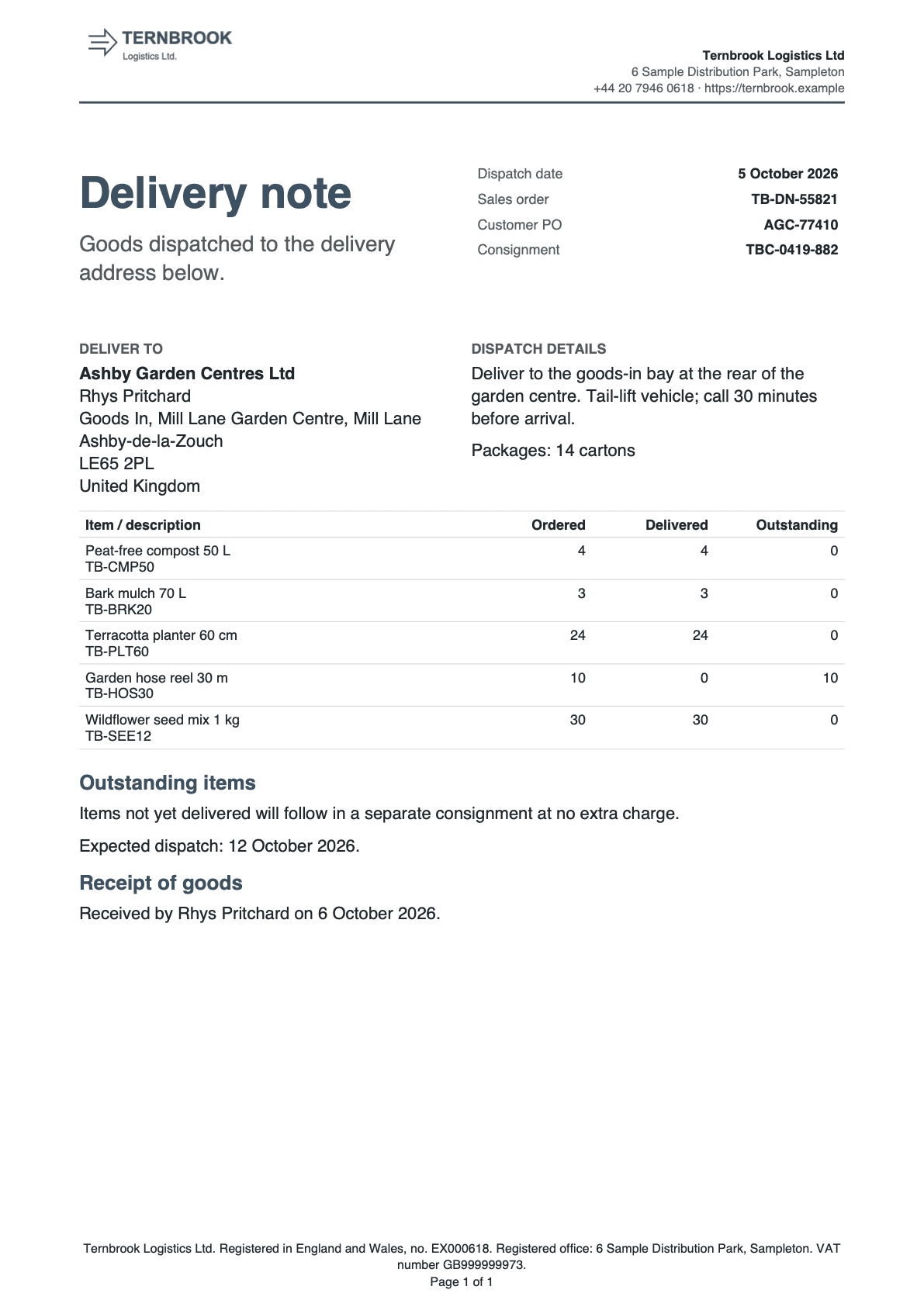
- Title and dispatch facts. The note title with the dates and references beside it.
- Deliver to and dispatch details. The address, the order’s notes and the number of packages.
- Ordered, delivered and outstanding. One row for each product.
- Outstanding items. Shown only while something is still to come.
- Receipt of goods. Who received it, or boxes to sign.
Title and dispatch facts
Guide: Put Salesforce data in a document.
| Part | Setting |
|---|---|
| Layout | Two columns, widths 50% and 50% |
| Left | Delivery note, then: Goods dispatched to the delivery address below. |
| Facts (right) | A Field grid with one column: Dispatch date, Sales order (the order’s name), Customer PO, Consignment (the order’s reference number). Borders None, Label colour Brand: Muted text, Bold labels off. Date format 4 March 2026 on Dispatch date |
| Dispatch date | A Total with Maximum of the products’ End Date: the latest delivery |
Deliver to and dispatch details
| Part | Setting |
|---|---|
| Layout | Two columns, widths 50% and 50% |
| Deliver to | A label in Muted text, then the account’s name, the ship-to contact’s name and the shipping address |
| Dispatch details | A label in Muted text, then the order’s description, then Packages: , the Packages answer and cartons |
Ordered, delivered and outstanding
One row for each product, even when the order lists a product on several lines. Guides: Show related records in a table and Add totals and calculations.
| Part | Setting |
|---|---|
| List | Order Products, At most (records) 100 |
| Columns | Item / description 52%, Ordered 15%, Delivered 16%, Outstanding 17% |
| Item | The product’s name, then its code |
| Grouping | Group and subtotal: Group rows by the product’s name, Print One row per group, with its subtotals. Subtotal 1 in column Ordered, Calculation Sum of the quantity. Subtotal 2 in column Delivered and Subtotal 3 in column Outstanding, each a Sum of a row calculation |
| Delivered | A row calculation, If / otherwise value: the quantity when the line is delivered, else 0 |
| Outstanding | A row calculation, If / otherwise value: 0 when the line is delivered, else the quantity |
| Rule | Line delivered: the line’s End Date is not blank |
| Style | Borders Rows |
| Layout | Repeat the heading row on each page, Keep the whole table on one page |
Outstanding items

Shown only while something is still to come. Guide: Show a section only when it applies.
| Part | Setting |
|---|---|
| Show when | Anything outstanding: Order Products has any row where the End Date is blank |
| Heading | Heading 3 Outstanding items |
| Text | Items not yet delivered will follow in a separate consignment at no extra charge. |
| Expected dispatch | Expected dispatch: , then a Total with Minimum of the products’ Start Date where the End Date is blank, and a full stop. Hide the whole line when empty |
Receipt of goods
Two versions, chosen by whether the order records who received the goods.
| Part | Setting |
|---|---|
| Heading | Heading 3 Receipt of goods |
| Show when Receipt signed | The order’s authorised-by name is not blank: Received by , that name, on, the authorised date |
| Show when Receipt not signed | The same name is blank, with Keep on one page: Please check the goods on arrival and complete this section. |
| Boxes to sign | A Static table with columns Item 30% and Entry 70%. Rows Condition on receipt (☐ Good ☐ Damaged ☐ Items missing), Notes, Received by (name), Signature and Date. Borders All, Vertical alignment Top |
Questions asked when generating
One question, added with @ › Values › Ask when generating….

| Question | Answer type | What it does |
|---|---|---|
| Packages | Number | Prints in Dispatch details as Packages: 14 cartons |
Make it yours
- Choose Page › Brand Kit. Under How this template gets its brand, choose One Brand Kit and pick your own approved kit.
- Retype Goods dispatched to the delivery address below. and the sentence under Outstanding items for your terms.
- Change the unit after the Packages answer if you ship in pallets or crates.
- Add a column, such as weight: select the table and choose Add a field column… under Columns.
- Choose Validate, then check, approve and generate.
Check it worked
In Preview, choose the order TB-DN-55821 and enter 14 as Packages. The Garden hose reel line reads 10 ordered, 0 delivered and 10 outstanding. The Outstanding items section prints, and Receipt of goods reads Received by and the contact’s name. Choose an order whose lines are all delivered and has no receiving contact: Outstanding items is gone and the boxes to sign appear.
If it doesn’t work
| What you see | Why | What to do |
|---|---|---|
| Delivery note is not in the gallery. | The gallery offers it only when the org has Orders. | Ask an administrator to turn on Orders. |
| The figures differ from the ones above. | They are for the sample record and answers. | Choose the sample record, enter the answers given, then choose Update preview. |
| Validate lists problems. | Proof, approval and activation refuse a draft until it is clean. | Fix them one block at a time and validate again. |
A field you expect is not listed after @. |
You see only fields you can read. Fields two or more lookups away are not found by search. | Open the lookup with its arrow in Insert and choose the field there. |
| A Show when section prints nothing, and neither does its Otherwise. | The value the rule tests is blank on that record. | Set If the rule can’t be checked to Show “Otherwise” instead. |
DATA_COLLECTION_TRUNCATED |
The record has more related rows than the list allows. | Raise At most (records) on that list. |
| The Generate a document panel lists no template. | A template appears once it is approved, activated and shared with you. | Finish check, approve and generate. |
More in Troubleshooting.
Next
Something unclear or wrong? Tell support.