
Connect Claude to Docable
Last updated 26 October 2026.
A draft template in Docable
With your fields and your Brand Kit.
AI works with your template and field names. It prepares. It never approves.
A person checks the proof and makes it live
Approval and activation always stay with a person.
Generate PDF and Word
By hand or in bulk.
At the end each person can ask Claude to find templates, draft and change them, and make documents in Docable, signed in to Salesforce as themselves. For a Salesforce administrator (steps 1 to 4, once per org) and each person who uses Claude (steps 5 and 6).
Before you start
- The org is Enterprise Edition or above. Installing Docable does not set up the server: an administrator does it once per org.
- Salesforce says hosted MCP servers may be billed, and each tool call counts against your daily API requests. Check both first.
- You are an administrator, and each person who will use Claude holds the Docable permission sets for what they do.
Steps
-
Deploy the server definition you want, from the metadata beside the package: Docable Studio (everything), Docable Studio (authors), Docable Studio (Brand Kits) or Docable Documents (generation only).
-
In Setup, open API Catalog › MCP Servers. On the Salesforce tab, find Docable Studio, choose Activate, and copy its server URL. It can take up to 2 minutes to answer.
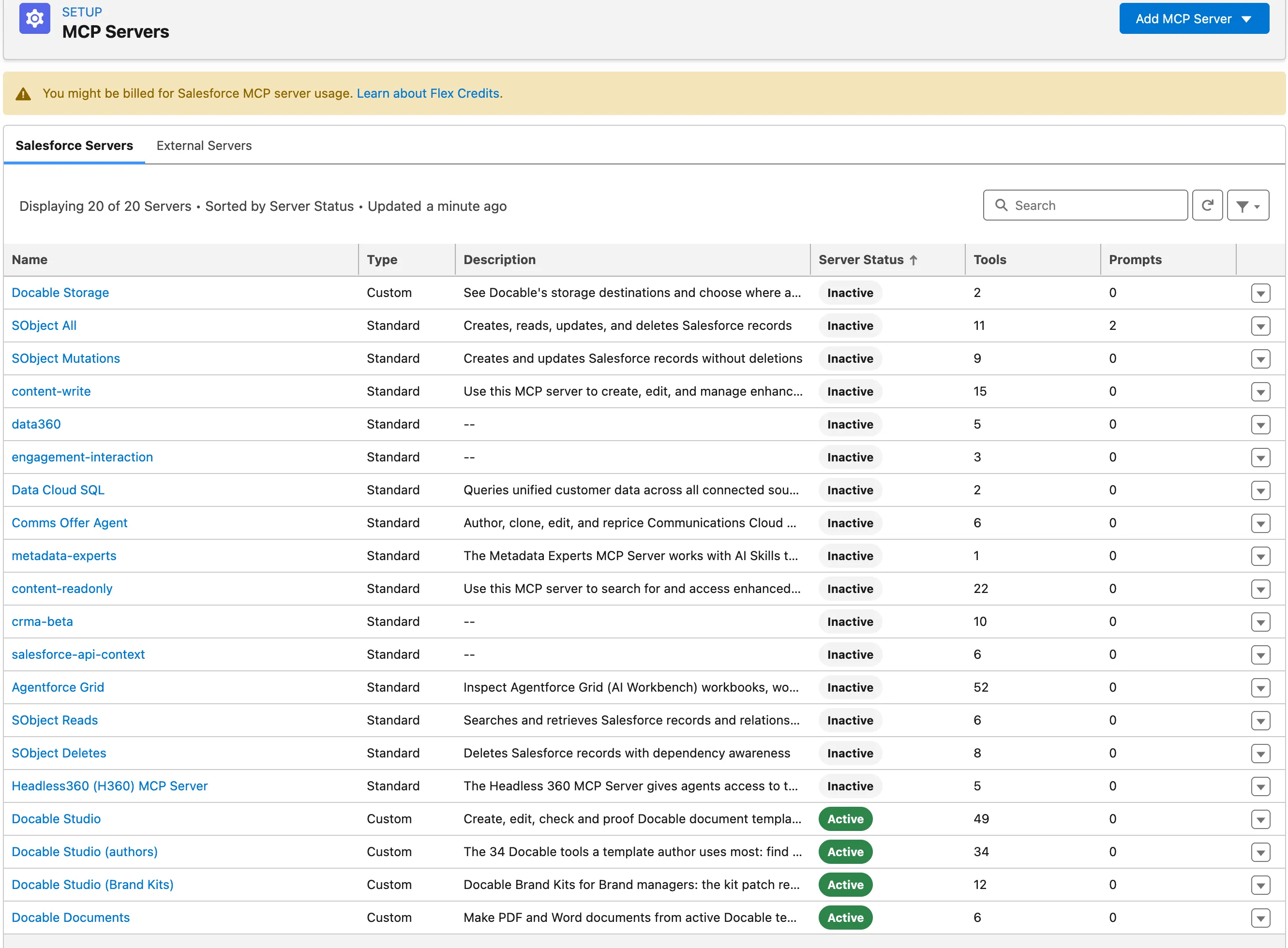
Setup › API Catalog › MCP Servers: the Salesforce servers list with Docable Studio, Docable Studio (authors), Docable Studio (Brand Kits) and Docable Documents active. -
Create an External Client App named Docable Claude connector. Enable OAuth with the callback URL
https://claude.ai/api/mcp/auth_callback, only the scopes Access MCP servers (mcp_api) and Perform requests at any time (refresh_token, offline_access), PKCE required, JWT-based access tokens on, and no client secret. Also turn on Refresh Token Rotation and Limit idle refresh token TTL to 30 days, and set the refresh-token policy to 30 days to match. Copy its Consumer Key. -
Give people their Docable role in Docable Setup › People and access: Template Author for authors, Document User for people who make documents, and Brand Manager as extra access for people who make Brand Kits.
-
Each person adds a custom connector in Claude named Docable Studio, with the server URL. They set the OAuth Client ID to the Consumer Key, leave the secret blank, choose Connect and sign in as themselves.
-
Ask Claude to call
get_capabilitiesfor Docable. It answers with your Docable permissions and the tools you can use.

If you haven’t used Docable from Claude for 30 days, Salesforce asks you to sign in again. Your connection settings stay as they are.
Make later changes to the app’s OAuth settings in Setup. Deploying them through the Metadata API switches off the 30-day limit and the IP allowlist, so turn them back on if you do.
To print with another of a template’s Brand Kits, ask for it by name: generate_document, start_generation_job and request_proofs take an optional brandKit. Claude can choose only a kit the template allows, approved and proved; anything else is refused with the allowed kits named.
Example
A document maker connects to Docable Documents. get_capabilities lists five generation tools: generate_document, start_generation_job, get_generation, cancel_generation and retry_generation. They are the same operations as the Flow actions, with the same inputs and outputs.
Check it worked
Claude answers get_capabilities as you, and list_templates lists the templates you can open. Ask Claude to draft a template: it answers with the editor link, and the draft opens in Docable for you to check and send for approval. No server lists an approve, activate, retire, restore or roll-back tool: Claude can prepare and ask for approval, and a person approves in Docable.

If it doesn’t work
| What Claude reports | What to do |
|---|---|
| It cannot connect at all, or says Docable Studio did not respond. | Check the server is active, the server URL, and the app’s callback URL and scopes. A new or changed app can take up to 30 minutes to work. Then disconnect and connect again. |
JWT Token is required |
Turn on the app’s option to issue JSON Web Token (JWT)-based access tokens for named users, wait, and connect again. |
Claude asks you to reconnect, or a call answers invalid_grant. |
You have not used Docable from Claude for 30 days, so Salesforce ended the connection. Choose Connect and sign in again. Nothing else changes. |
CapabilityUnavailable or a licence code. |
Assign the permission set the message names, or a Docable licence. |
Next
Something unclear or wrong? Tell support. Product page: Automation and API.