
How the Merrowvale catalogue was built
Last updated 26 October 2026.
Colours are Brand Kit colours: Primary, Table header text, Muted text and Callout fill.
Before you start
- Docable installed, and access to create templates: see Permissions and readiness.
- An approved Brand Kit: see Give your documents a Brand Kit.
- A price book, Merrowvale Workplace Catalogue 2026 in the sample, with its price book entries. Give each product a File titled Catalogue image to print its picture.
Start from the Product catalogue quick start
-
In the Docable app, open Templates, choose New, then Start from a quick start.
-
Choose Product catalogue.
-
Under Brand Kit, choose your approved kit. The sample uses Merrowvale.
-
Choose Use as it is. The template opens in the editor, built on Price Book, with the price book’s entries as the list Catalogue entries.
The blocks on the page
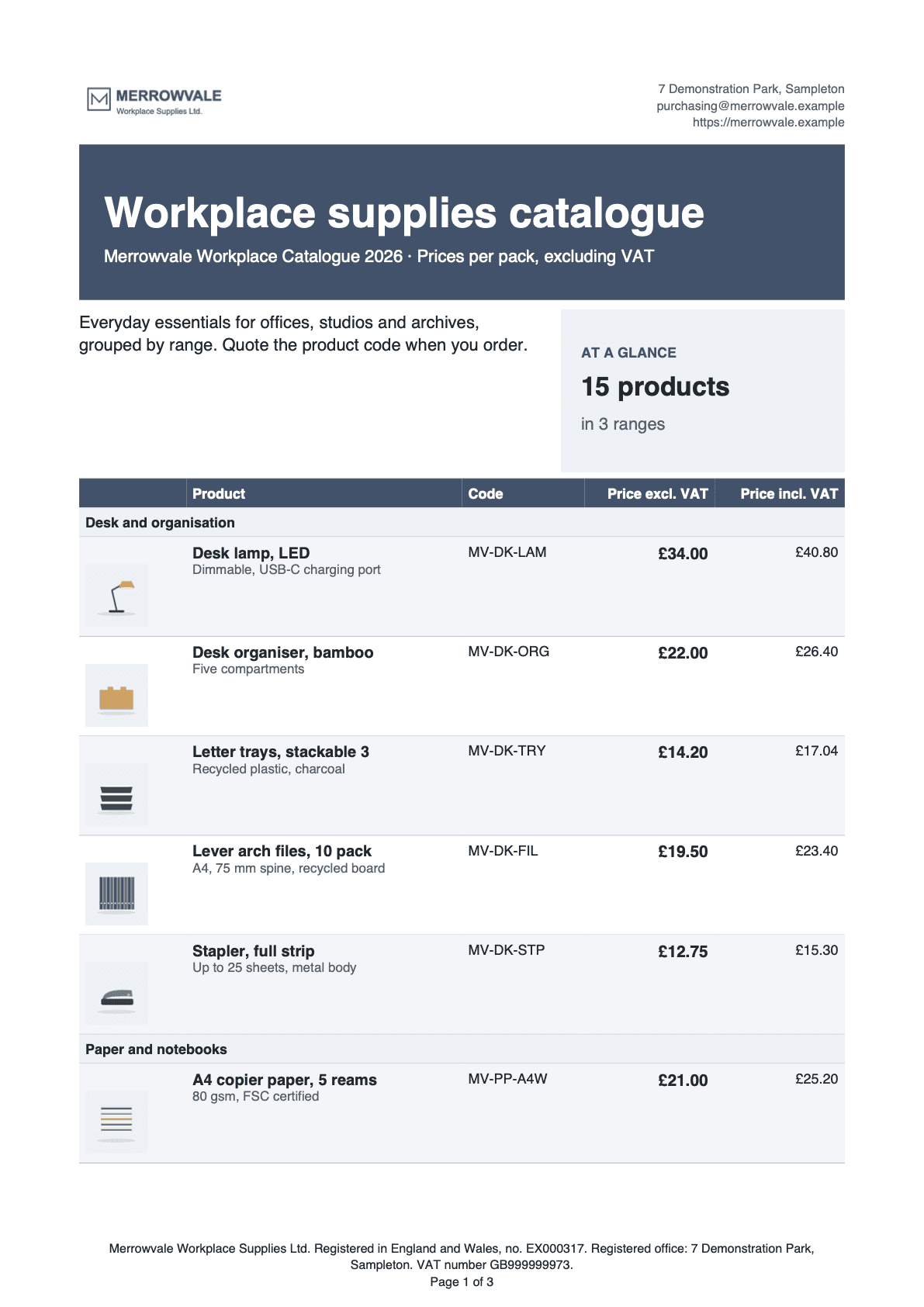
- Letterhead and title band. The logo and contact details, then the title in a coloured band.
- Intro and at a glance. A welcome line, and the product and range counts.
- Catalogue table. Active products grouped by range, each with a picture.
Letterhead and title band
Guide: Put Salesforce data in a document.
| Part | Setting |
|---|---|
| Header | Page › Brand Kit: Use the kit’s header (letterhead) off and Use the kit’s footer (legal line, badges, page numbers) on. The first block makes its own letterhead |
| Layout | Two columns, widths 50% and 50% |
| Logo | The main logo from the Brand tab, Logo › Main logo, 120 by 48 pt, Fit Fit inside, If the image is missing Leave it out |
| Contact | The Brand Kit’s trading address, email and website; 8 pt, Muted text |
| Title band | A Callout box: Fill Primary, Padding (pt) 16, Sides None. Heading 1 Workplace supplies catalogue, 27 pt, bold, in the Brand Kit’s table header text colour |
| Subtitle | The price book’s name, then · Prices per pack, excluding VAT; 11 pt, same colour |
Intro and at a glance
Two columns, widths 62% and 38%. Guide: Add totals and calculations.
| Part | Setting |
|---|---|
| Intro | A paragraph for your buyers: Everyday essentials for offices, studios and archives, grouped by range. Quote the product code when you order. |
| At a glance | A Callout box: Sides Left, Border width (pt) 3, Fill Callout fill, Padding (pt) 10, with a Primary border |
| Heading | Heading 2 AT A GLANCE, 9 pt, Primary |
| Product count | A Total with Count over the active catalogue entries, 17 pt, bold |
| Range count | A Total with Count distinct over the product’s family |
| Wording | Two If / otherwise value calculations print product or products, range or ranges, so 1 product reads in the singular |
Catalogue table
Active products only, grouped by range. Guides: Show related records in a table and Add pictures and photos.
| Part | Setting |
|---|---|
| List | Catalogue entries, the price book’s entries, filtered with Filter, sort and limit… to the rule Active entry of an active product: the entry is active and its product is active. Sort by the product’s family, then its name. At most (records) 200 |
| Grouping | Group and subtotal: Group rows by the product’s family, Print Every row, under a heading per group. Products with no family come last, under Other products |
| Columns | Picture 14%, Product 36%, Code 16%, Price excl. VAT 17%, Price incl. VAT 17% |
| Picture | Add an image column. Image from A File on each record, File title Catalogue image, 54 by 40 pt, If the image is missing Leave it out |
| Product | The product’s name, then its description in Muted text |
| Prices | Currency shown as a symbol, Decimal places 2 |
| No products | Message This price list has no active products. |
| Style | Use Brand Kit defaults. Layout: Repeat the heading row on each page, Keep the whole table on one page |
Two versions of the table
The price-with-tax column appears only when someone gives a tax rate.
| Part | Setting |
|---|---|
| Show when | Tax rate given: the Tax rate answer is not blank. The table above, with Price incl. VAT |
| Otherwise | The same table without that column: Picture 14%, Product 42%, Code 18%, Price excl. VAT 26%. Add it with Add or remove “Otherwise” |
| Price incl. VAT | A calculation. Multiply the price by the Tax rate answer, Add that to the price, then Round to 2 places |
How to order
| Part | Setting |
|---|---|
| Panel | A Callout box: Sides Left, Border width (pt) 3, Fill Callout fill, with Keep on one page |
| Text | Heading 2 HOW TO ORDER, then three 9 pt paragraphs: how to email the Brand Kit’s email with codes and quantities; that prices are per pack and exclude VAT and delivery; and the price list name and the date it was printed |
Questions asked when generating
One question, added with @ › Values › Ask when generating….

| Question | Answer type | What it does |
|---|---|---|
| Tax rate | Percent | Adds the Price incl. VAT column. 20 means 20%. Blank leaves it out |
File name
Under Page, in File name: Add text Catalogue, then Add a field and choose the price book’s name.
Make it yours
- Choose Page › Brand Kit. Under How this template gets its brand, choose One Brand Kit and pick your kit.
- Retype the title, the intro and the How to order paragraphs.
- Save a File titled Catalogue image on each product. The next proof prints it.
- Put a product in a range by giving it a family. A product with no family prints under Other products.
- Choose Validate, then check, approve and generate.
Check it worked
In Preview, choose the price book Merrowvale Workplace Catalogue 2026 and enter a Tax rate of 20. The panel reads 15 products in 3 ranges. Under the heading Desk and organisation, Desk lamp, LED is 34.00 excluding VAT and 40.80 including it. Clear the Tax rate and choose Update preview: the last column is gone.
If it doesn’t work
| What you see | Why | What to do |
|---|---|---|
| The figures differ from the ones above. | They are for the sample record and answers. | Choose the sample record, enter the answers given, then choose Update preview. |
| Validate lists problems. | Proof, approval and activation refuse a draft until it is clean. | Fix them one block at a time and validate again. |
A field you expect is not listed after @. |
You see only fields you can read. Fields two or more lookups away are not found by search. | Open the lookup with its arrow in Insert and choose the field there. |
| A Show when section prints nothing, and neither does its Otherwise. | The value the rule tests is blank on that record. | Set If the rule can’t be checked to Show “Otherwise” instead. |
| A picture is missing. | The File title must match exactly, and a private File or one shared by a public link counts as missing. | Check the File’s title on the record. |
DATA_COLLECTION_TRUNCATED |
The record has more related rows than the list allows. | Raise At most (records) on that list. |
| The Generate a document panel lists no template. | A template appears once it is approved, activated and shared with you. | Finish check, approve and generate. |
More in Troubleshooting.
Next
Something unclear or wrong? Tell support.